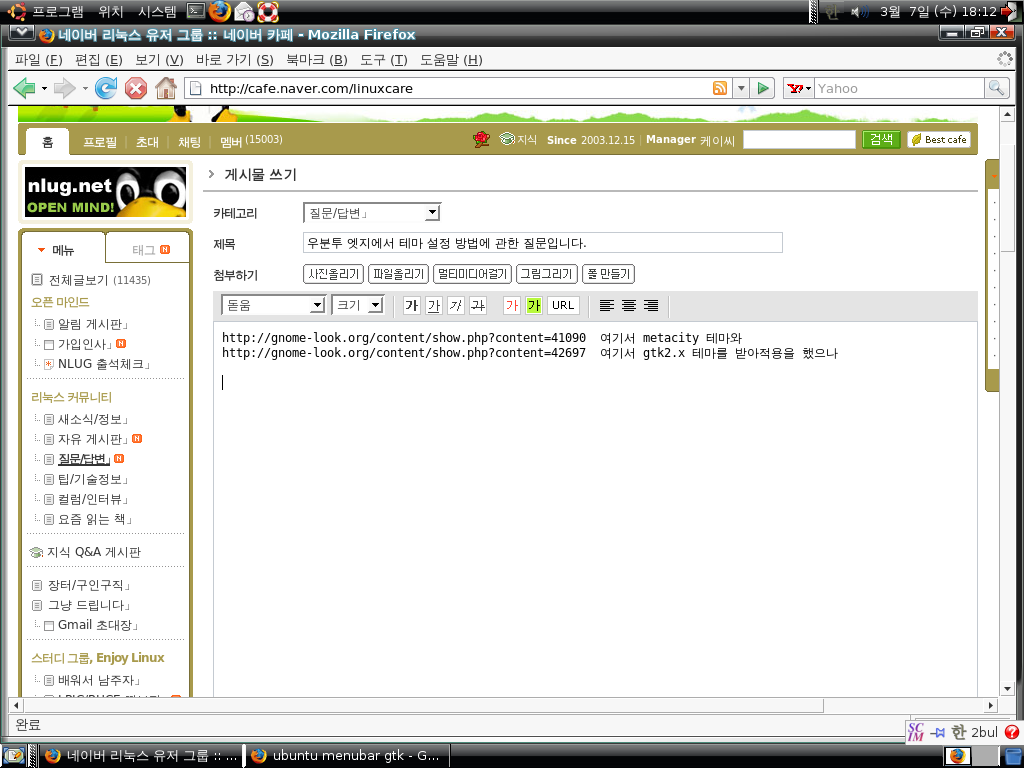
ubuntu edgy 에서의 테마 설정 문제 질문입니다.

hl5pma의 이미지

http://gnome-look.org/content/show.php?content=41090 여기서 metacity 테마와
http://gnome-look.org/content/show.php?content=42697 여기서 gtk2.x 테마를 받아적용을 했으나

첨부한 스크린샷과 같이 창메뉴가 바뀌질 않았고 위아래 패널의 모습이 아주 어설프게 바뀌었군요
이유가 뭔지 도통 몰라 검색을 해보고 외국사이트 번역도 해가면서 봐도 도저히 이유를 찾을수가 없어 질문합니다.
아시는분은 좀 도와주세요

File attachments: 
첨부파일 크기
Image icon s.png147.11 KB

댓글 달기

Filtered HTML

  • 텍스트에 BBCode 태그를 사용할 수 있습니다. URL은 자동으로 링크 됩니다.
  • 사용할 수 있는 HTML 태그: <p><div><span><br><a><em><strong><del><ins><b><i><u><s><pre><code><cite><blockquote><ul><ol><li><dl><dt><dd><table><tr><td><th><thead><tbody><h1><h2><h3><h4><h5><h6><img><embed><object><param><hr>
  • 다음 태그를 이용하여 소스 코드 구문 강조를 할 수 있습니다: <code>, <blockcode>, <apache>, <applescript>, <autoconf>, <awk>, <bash>, <c>, <cpp>, <css>, <diff>, <drupal5>, <drupal6>, <gdb>, <html>, <html5>, <java>, <javascript>, <ldif>, <lua>, <make>, <mysql>, <perl>, <perl6>, <php>, <pgsql>, <proftpd>, <python>, <reg>, <spec>, <ruby>. 지원하는 태그 형식: <foo>, [foo].
  • web 주소와/이메일 주소를 클릭할 수 있는 링크로 자동으로 바꿉니다.

BBCode

  • 텍스트에 BBCode 태그를 사용할 수 있습니다. URL은 자동으로 링크 됩니다.
  • 다음 태그를 이용하여 소스 코드 구문 강조를 할 수 있습니다: <code>, <blockcode>, <apache>, <applescript>, <autoconf>, <awk>, <bash>, <c>, <cpp>, <css>, <diff>, <drupal5>, <drupal6>, <gdb>, <html>, <html5>, <java>, <javascript>, <ldif>, <lua>, <make>, <mysql>, <perl>, <perl6>, <php>, <pgsql>, <proftpd>, <python>, <reg>, <spec>, <ruby>. 지원하는 태그 형식: <foo>, [foo].
  • 사용할 수 있는 HTML 태그: <p><div><span><br><a><em><strong><del><ins><b><i><u><s><pre><code><cite><blockquote><ul><ol><li><dl><dt><dd><table><tr><td><th><thead><tbody><h1><h2><h3><h4><h5><h6><img><embed><object><param>
  • web 주소와/이메일 주소를 클릭할 수 있는 링크로 자동으로 바꿉니다.

Textile

  • 다음 태그를 이용하여 소스 코드 구문 강조를 할 수 있습니다: <code>, <blockcode>, <apache>, <applescript>, <autoconf>, <awk>, <bash>, <c>, <cpp>, <css>, <diff>, <drupal5>, <drupal6>, <gdb>, <html>, <html5>, <java>, <javascript>, <ldif>, <lua>, <make>, <mysql>, <perl>, <perl6>, <php>, <pgsql>, <proftpd>, <python>, <reg>, <spec>, <ruby>. 지원하는 태그 형식: <foo>, [foo].
  • You can use Textile markup to format text.
  • 사용할 수 있는 HTML 태그: <p><div><span><br><a><em><strong><del><ins><b><i><u><s><pre><code><cite><blockquote><ul><ol><li><dl><dt><dd><table><tr><td><th><thead><tbody><h1><h2><h3><h4><h5><h6><img><embed><object><param><hr>

Markdown

  • 다음 태그를 이용하여 소스 코드 구문 강조를 할 수 있습니다: <code>, <blockcode>, <apache>, <applescript>, <autoconf>, <awk>, <bash>, <c>, <cpp>, <css>, <diff>, <drupal5>, <drupal6>, <gdb>, <html>, <html5>, <java>, <javascript>, <ldif>, <lua>, <make>, <mysql>, <perl>, <perl6>, <php>, <pgsql>, <proftpd>, <python>, <reg>, <spec>, <ruby>. 지원하는 태그 형식: <foo>, [foo].
  • Quick Tips:
    • Two or more spaces at a line's end = Line break
    • Double returns = Paragraph
    • *Single asterisks* or _single underscores_ = Emphasis
    • **Double** or __double__ = Strong
    • This is [a link](http://the.link.example.com "The optional title text")
    For complete details on the Markdown syntax, see the Markdown documentation and Markdown Extra documentation for tables, footnotes, and more.
  • web 주소와/이메일 주소를 클릭할 수 있는 링크로 자동으로 바꿉니다.
  • 사용할 수 있는 HTML 태그: <p><div><span><br><a><em><strong><del><ins><b><i><u><s><pre><code><cite><blockquote><ul><ol><li><dl><dt><dd><table><tr><td><th><thead><tbody><h1><h2><h3><h4><h5><h6><img><embed><object><param><hr>

Plain text

  • HTML 태그를 사용할 수 없습니다.
  • web 주소와/이메일 주소를 클릭할 수 있는 링크로 자동으로 바꿉니다.
  • 줄과 단락은 자동으로 분리됩니다.
댓글 첨부 파일
이 댓글에 이미지나 파일을 업로드 합니다.
파일 크기는 8 MB보다 작아야 합니다.
허용할 파일 형식: txt pdf doc xls gif jpg jpeg mp3 png rar zip.
CAPTCHA
이것은 자동으로 스팸을 올리는 것을 막기 위해서 제공됩니다.